Sketch Your Way: A Supportive Mobile App for Artists
I initiated Sketch Your Way from a simple research question: how might digital tools provide flexible, approachable support for people who are interested in practicing art but struggle to start and sustain it? I carried the project through the full research and design process—ultimately reimagining an existing product through a high-fidelity prototype vibe coded with Base44.
Role
UX Researcher, UX Designer, & Prototype Developer (Independent Project)
Industry
Creative Tools
Project Context
This project was developed as my capstone for my Master’s in Human-Computer Interaction. I set out to explore a problem space, define a focused opportunity, and design a solution grounded in user research.
Problem Discovery
I began by focusing on women in their mid to late 20s as an initial target group, selected for their interest in creative practices, familiarity with digital tools, and the challenge of balancing busy routines.
To understand what prevents people from starting and maintaining an art practice, I conducted seven interviews and analyzed the competitive landscape across art apps, wellness tools, and creative spaces, supported by relevant academic literature.
Key Insights
I synthesized interview data through thematic coding, identifying three key insights that revealed where and why the art-making process breaks down.

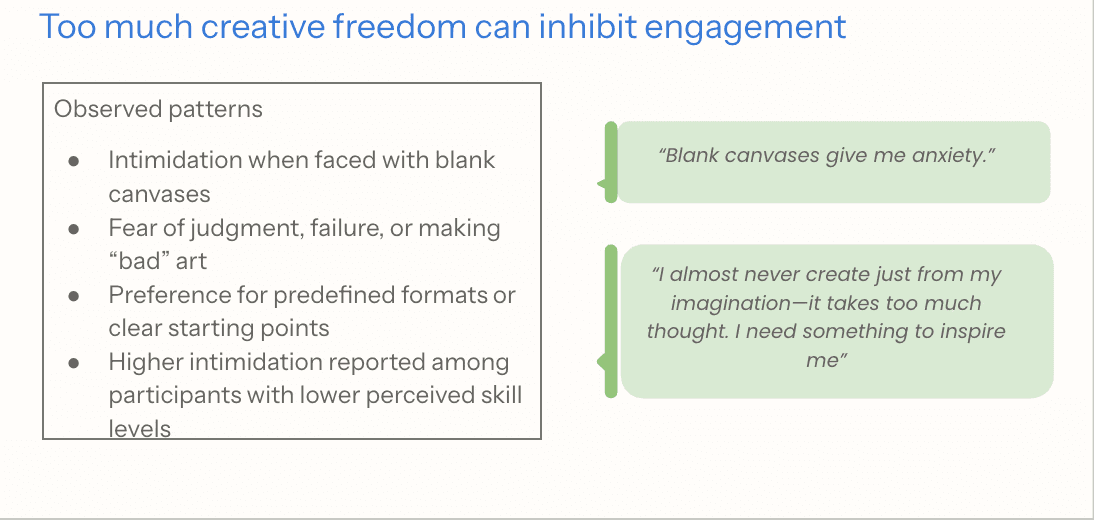
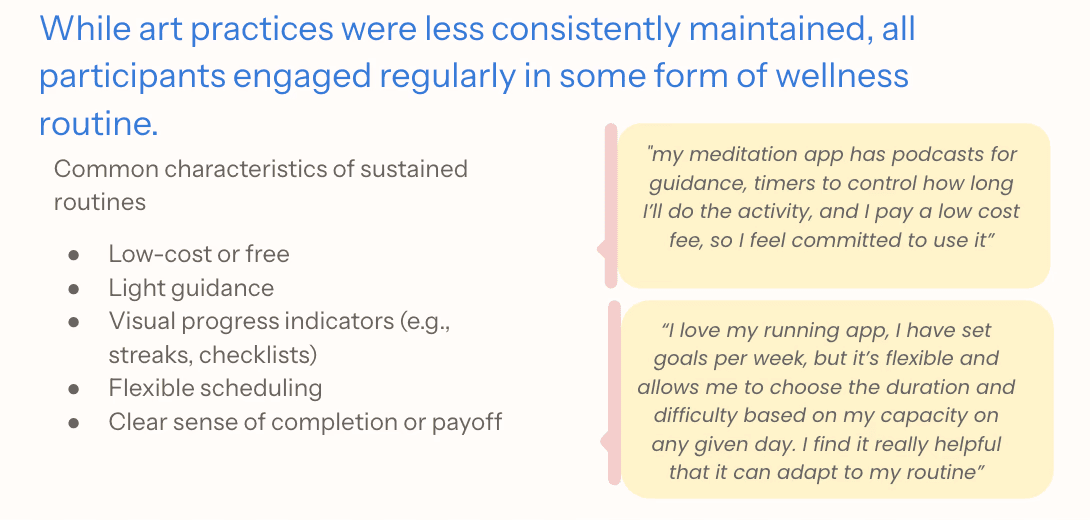
I analyzed the competitive landscape through a SWOT-style lens to understand how existing tools support—or fail to support—these moments of friction.

These findings informed the creation of a target user persona and a pre-solution user journey, mapping how users currently approach, delay, or abandon art-making.
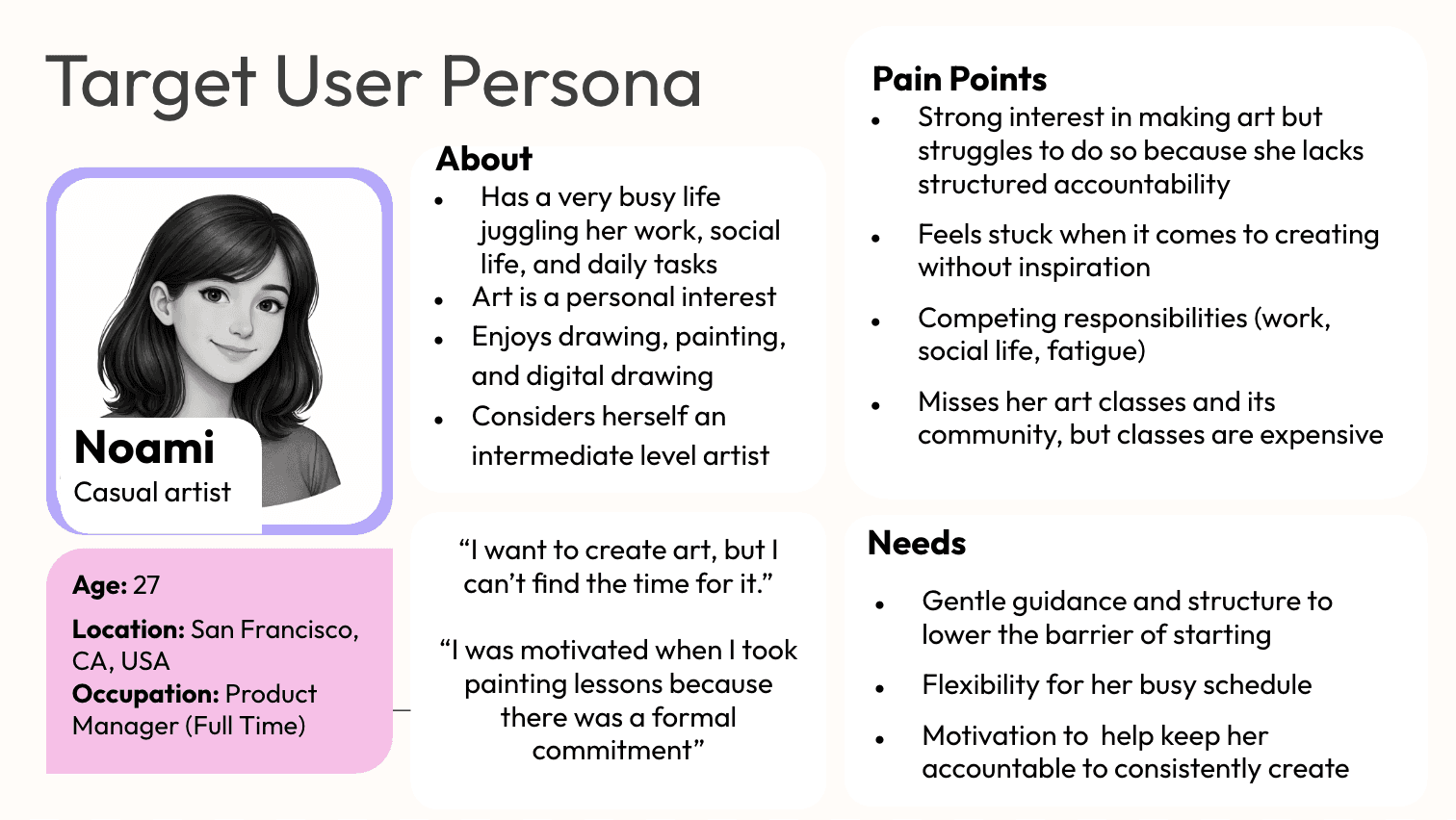
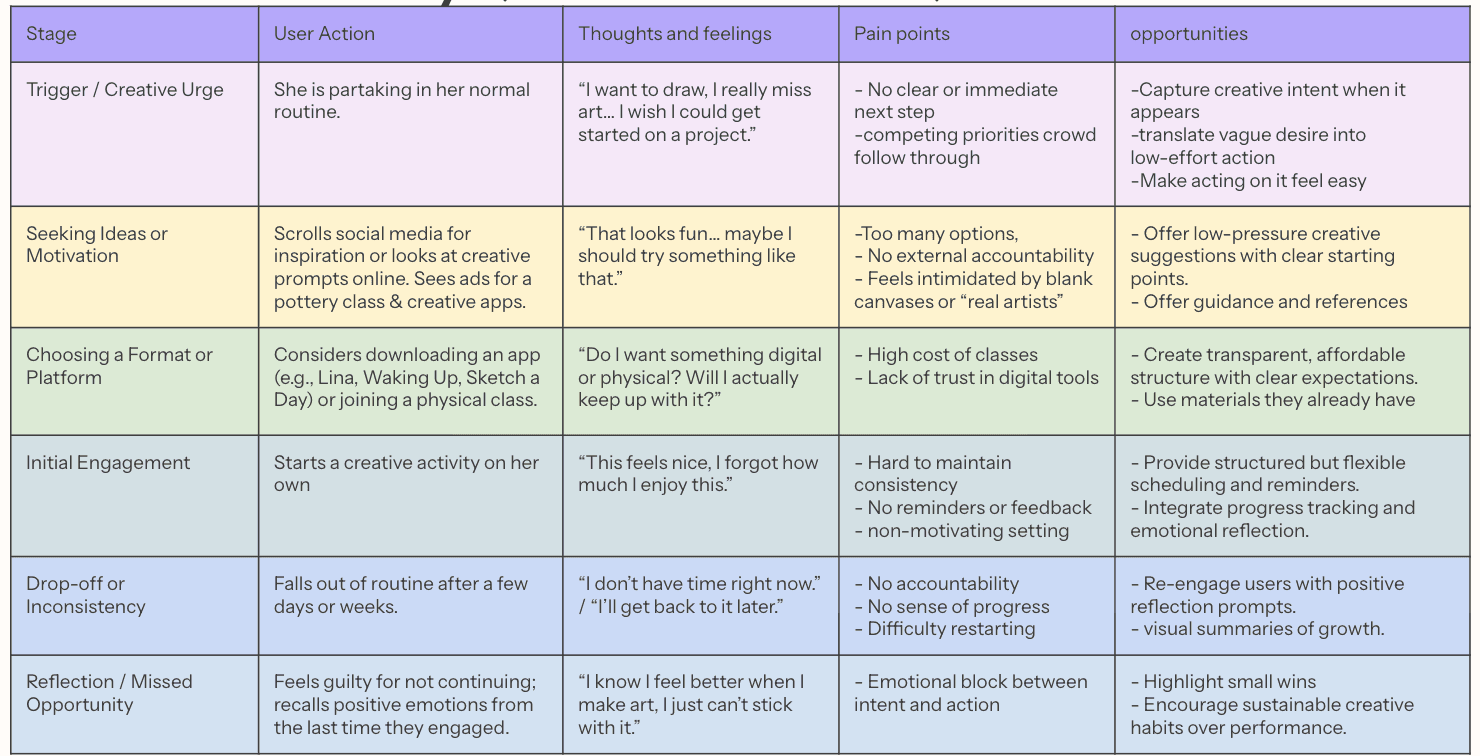
Through research synthesis, five recurring challenges emerged (see diagram below). Rather than existing independently, these challenges interact and reinforce one another, shaping how users approach or avoid art-making.
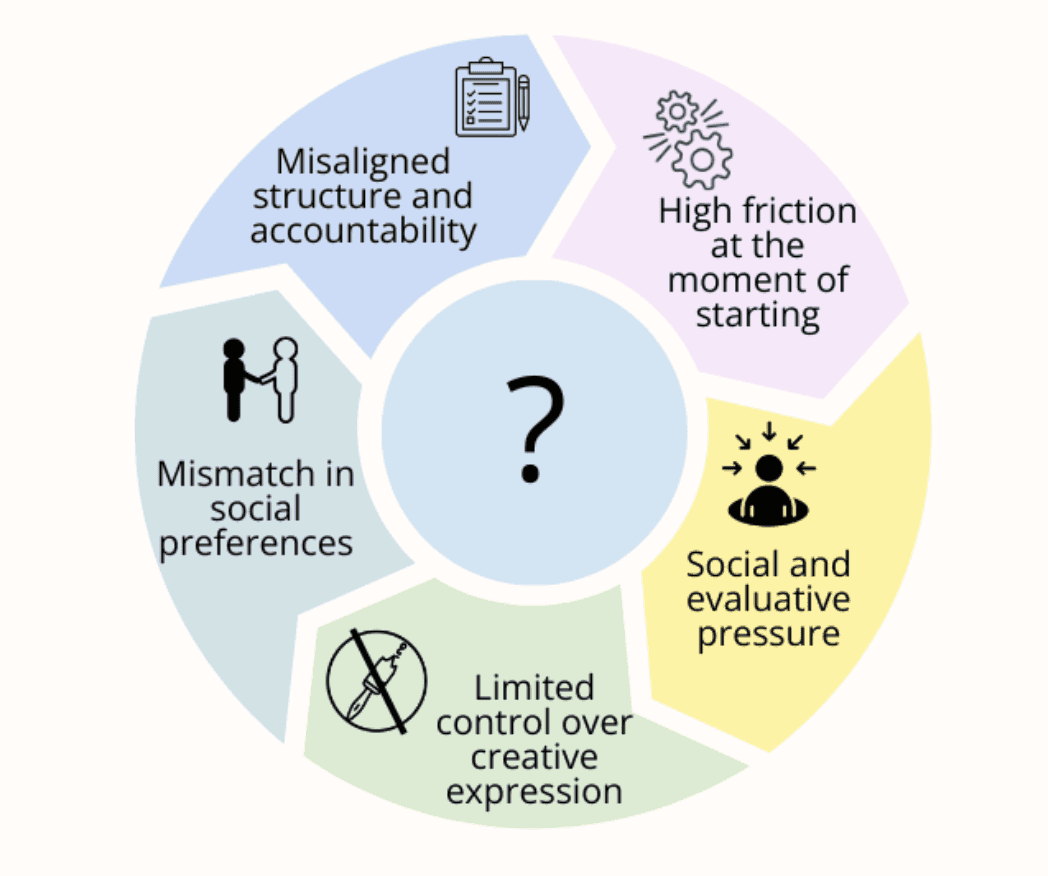
Together, these patterns point to a single underlying issue: despite a strong interest in creating, users struggle to translate that intent into sustained practice due to a lack of flexible, approachable support that fits into their daily lives.
From this, I defined the HMW question:
How might we design flexible and approachable forms of support that help women in their mid to late 20s start and sustain a 2D visual art practice within real-life constraints?
Solution Strategy
Rather than designing a new system from scratch, I used the existing app Sketch a Day as a design context to explore how research-informed improvements could better support sustained art practice. While the app aligns with key patterns identified in my research, it also exposes gaps in flexibility, structure, and user autonomy.
Working within an existing product allowed me to evaluate real user flows, identify breakdown points, and test targeted design changes grounded in user needs.
Early Flow Concept
To define an improved experience, I first evaluated Sketch a Day’s primary user flow to identify where breakdowns occur. I then conducted four in-depth interviews to gather feedback on both the current experience and a set of research-informed design hypotheses.
Insights from these conversations were used to design the primary flow of the proposed solution: Sketch Your Way, resulting in a new, more supportive experience. This updated flow is illustrated in the storyboard below.
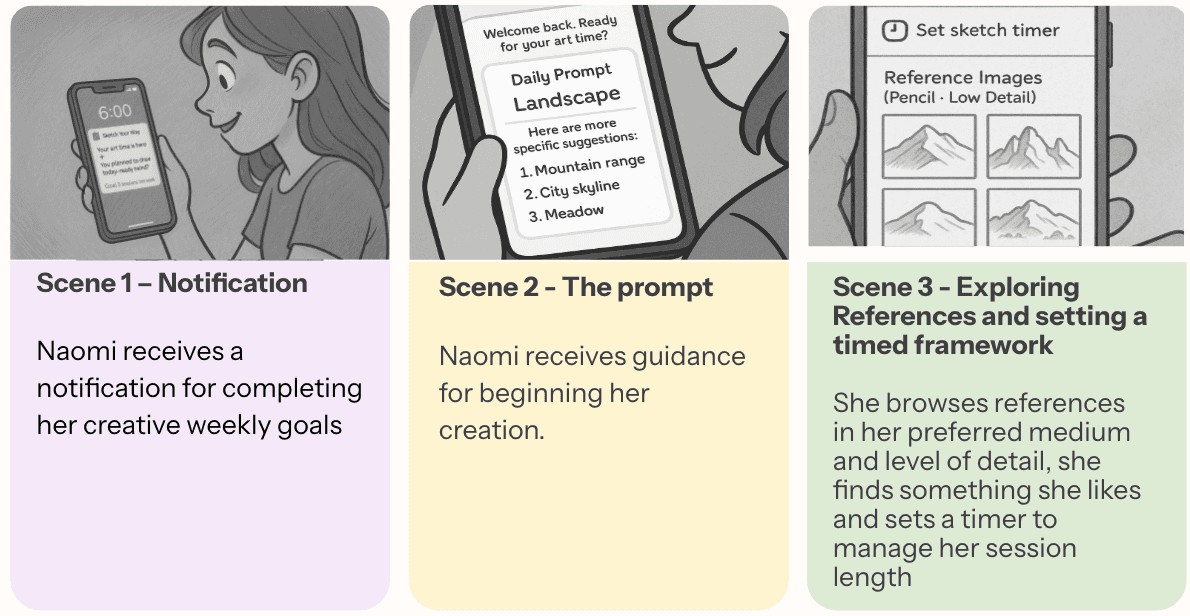
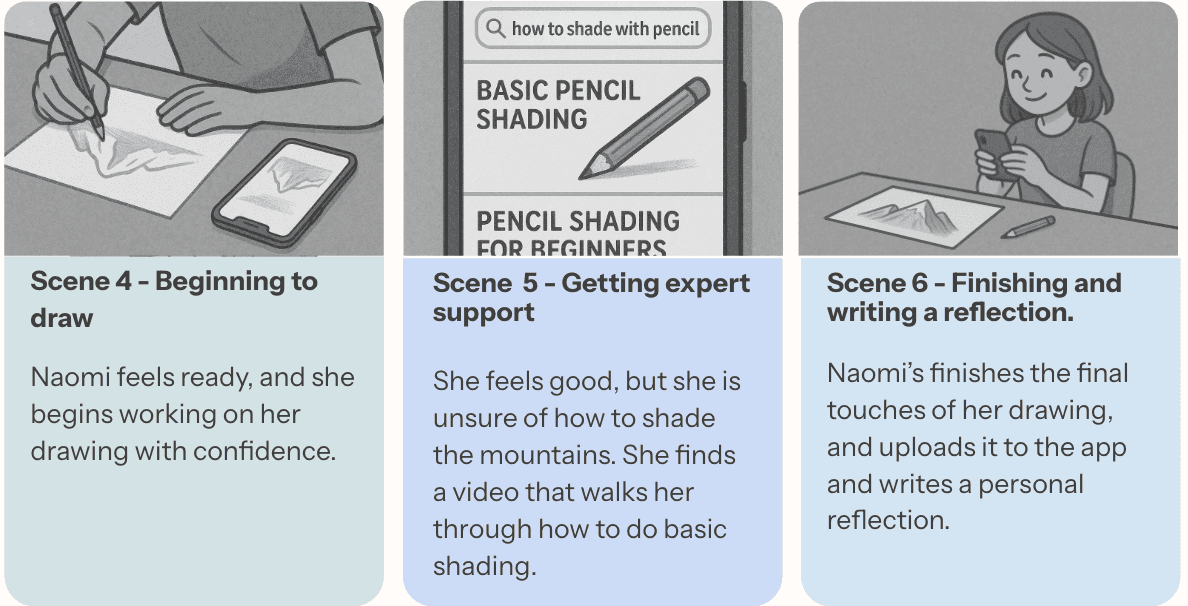
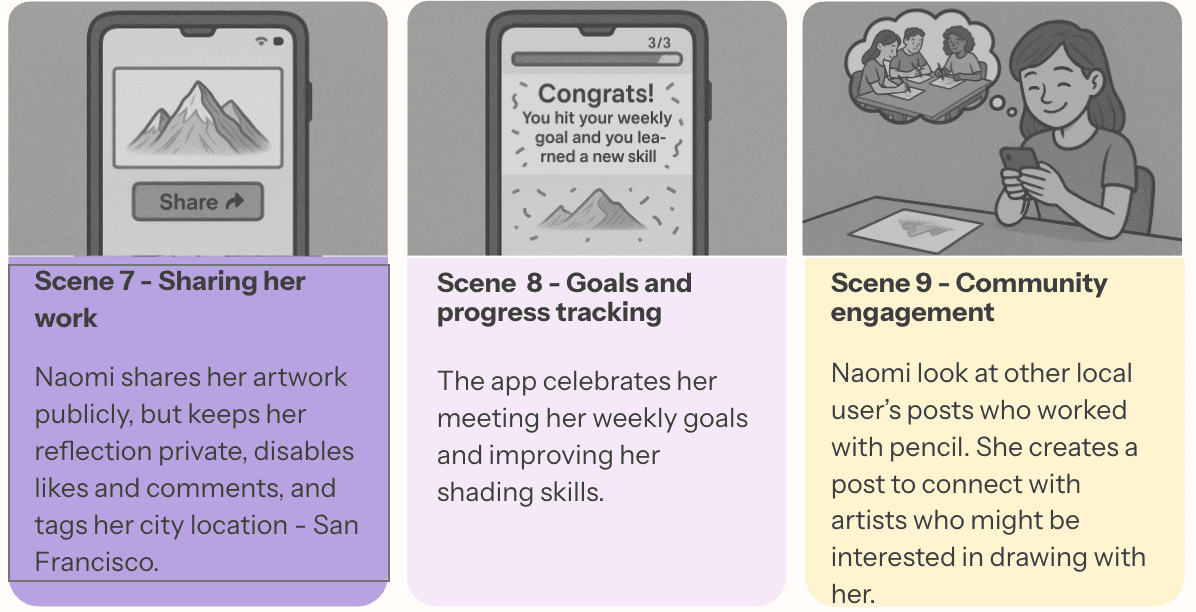
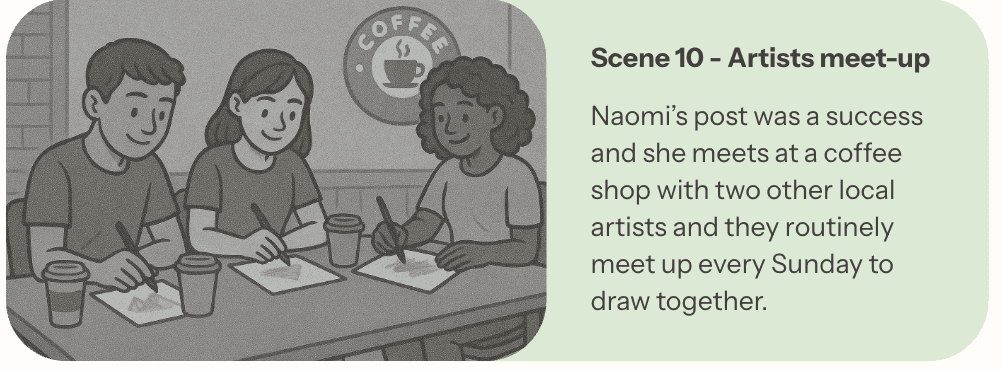
This storyboard demonstrates how prompts, references, timing support, reflection, progress tracking, and community features could work together as one guided experience. It was then brought back to users for feedback before wire-framing.
Prototyping and Iteration with Vibe Coding
I refined the early concept based on feedback from four follow-up interviews, translating it into wireframes and then into a high-fidelity prototype in Base44. Guided by a PRD and structured prompt engineering, I iterated extensively, completing 286 versions across 14 screens.
Throughout the process, I incorporated feedback from potential users, UX professionals, and app creators to continuously improve the product.
How the Solution Improves on Sketch a Day
The sections below demonstrate how the solution addresses two key challenges identified through research. Additional features can be explored in the full prototype linked at the end.
Each section begins by evaluating how Sketch a Day currently addresses the challenge, followed by how the proposed solution responds with a more flexible and supportive approach.
Sketch A Day's Approach: Structure and Accountability
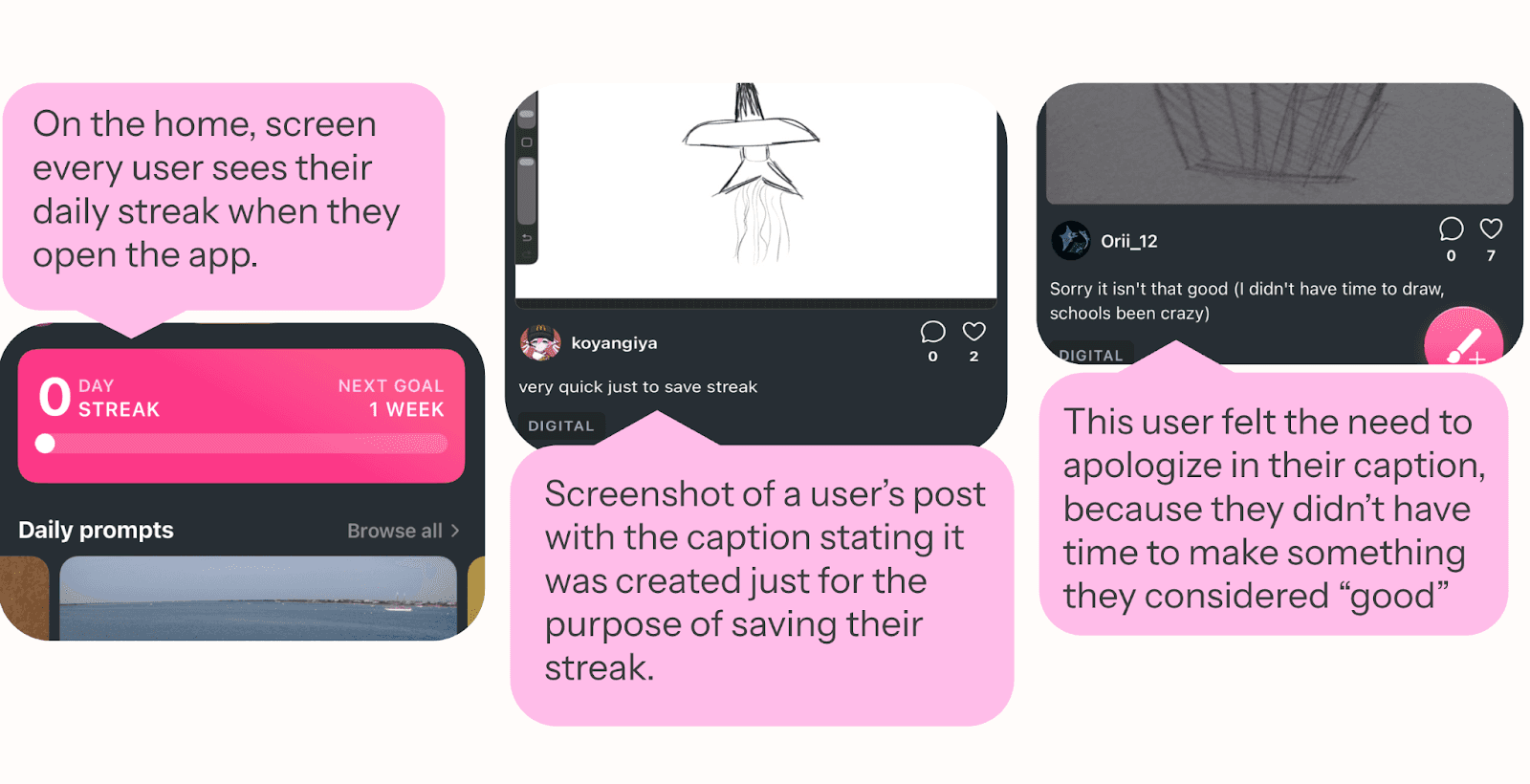
Sketch a Day relies on a fixed daily streak model, where all users are expected to create every day. While this can encourage short-term engagement, it introduces pressure when users are unable to keep up. For example, a user may have been practicing regularly, but after missing a single day, the first thing they see when reopening the app is a reset to zero—framing progress as lost rather than cumulative.
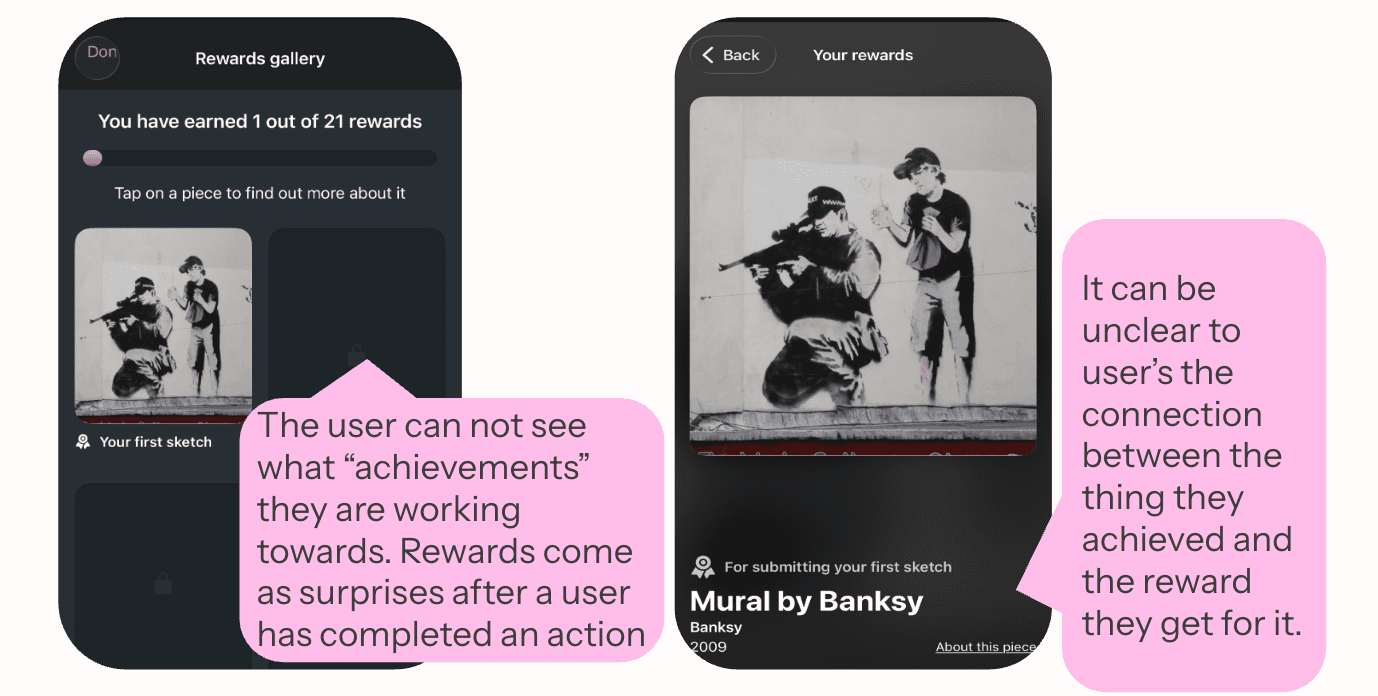
Additionally, rewards are surfaced through a separate gallery where users receive “awards” for actions they were not explicitly working toward. These rewards are locked, and the system does not indicate what behaviors lead to unlocking them, making progress feel opaque and disconnected from user effort.
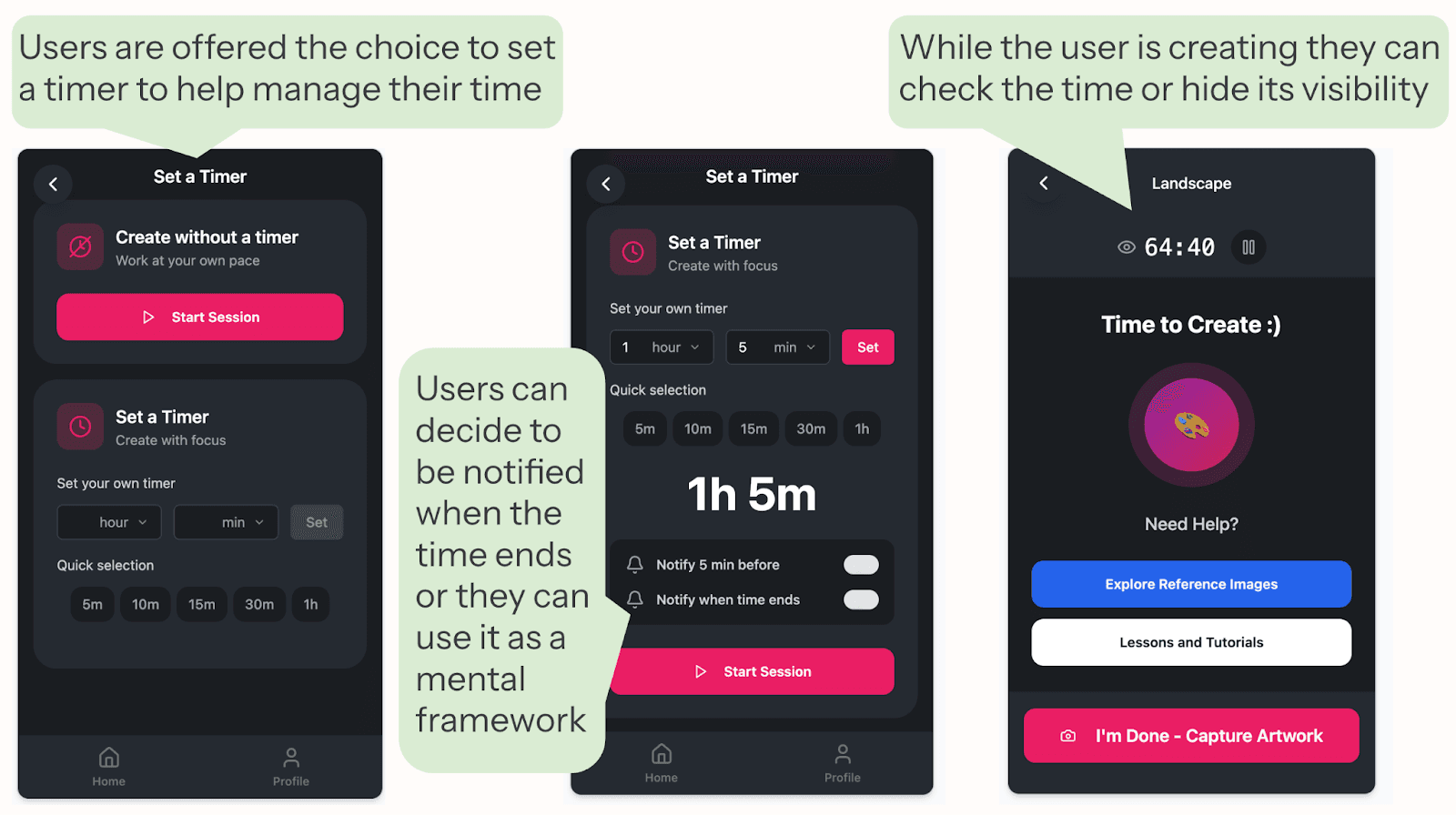
Sketch a Day offers no support for time awareness or session planning, leaving users to fully self-regulate how long they spend creating. For users with busy or unpredictable schedules, this makes it difficult to fit art-making into their day, as there is no clear way to scope or contain the activity. Without defined time boundaries, starting can feel more demanding, and sessions can feel either too open-ended or difficult to manage.
The Proposed Solution: Structure and Accountability
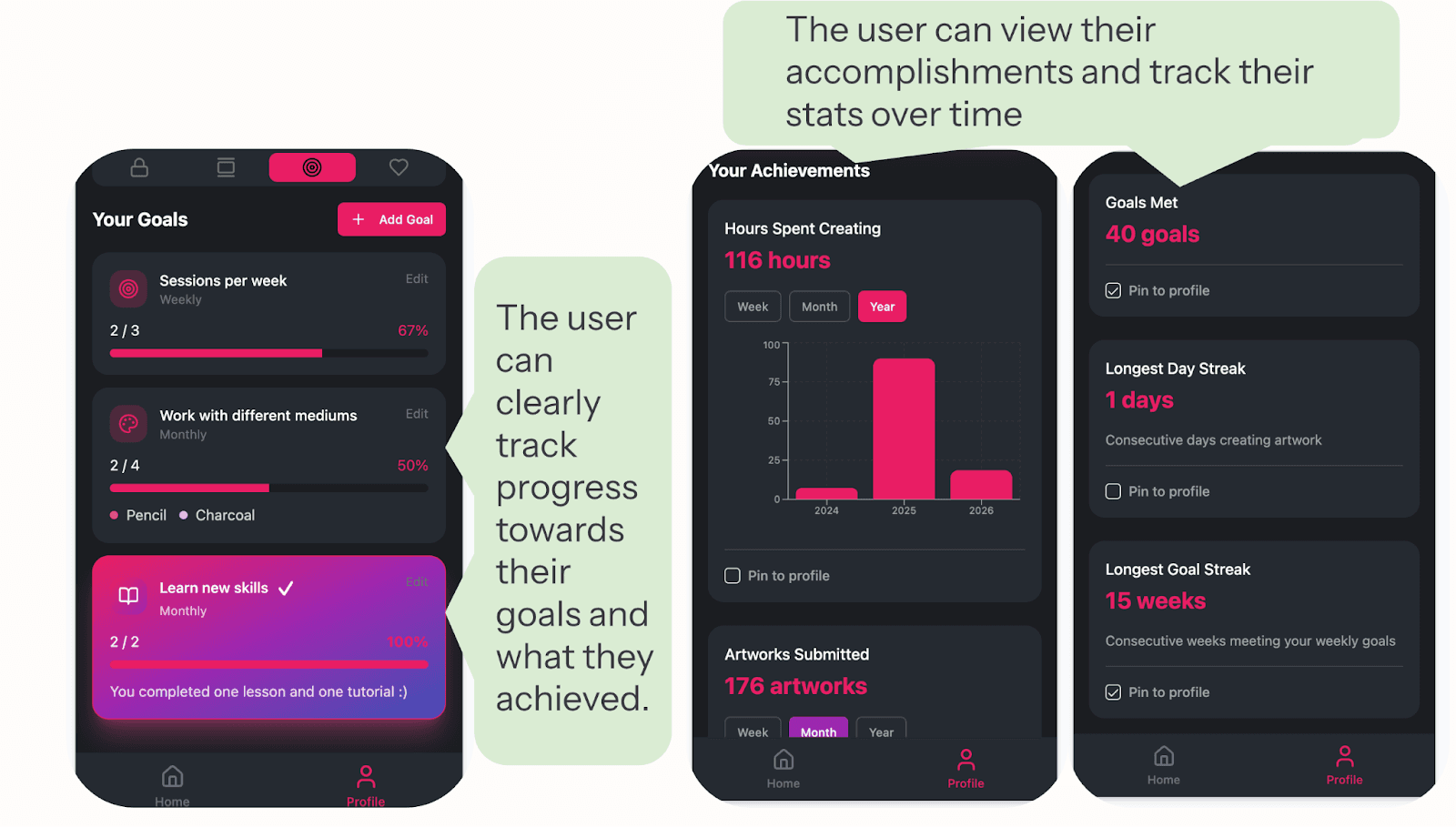
The solution replaces this rigid structure with a more flexible system centered on user-defined goals. Instead of enforcing daily participation, users set weekly goals based on their own schedules and capacity.
Progress is made visible through real-time tracking, giving users a clear understanding of how their actions contribute toward their goals. Rather than unlocking unclear rewards after the fact, users receive transparent feedback that reflects what they are actively working toward.
My solution introduces optional timers, session framing, and visible time while creating, helping users better integrate art-making into their routines. By allowing users to define the length of a session, the system reduces the effort required to start and supports more consistent engagement over time.
Sketch a Day's Approach: Social Preferences
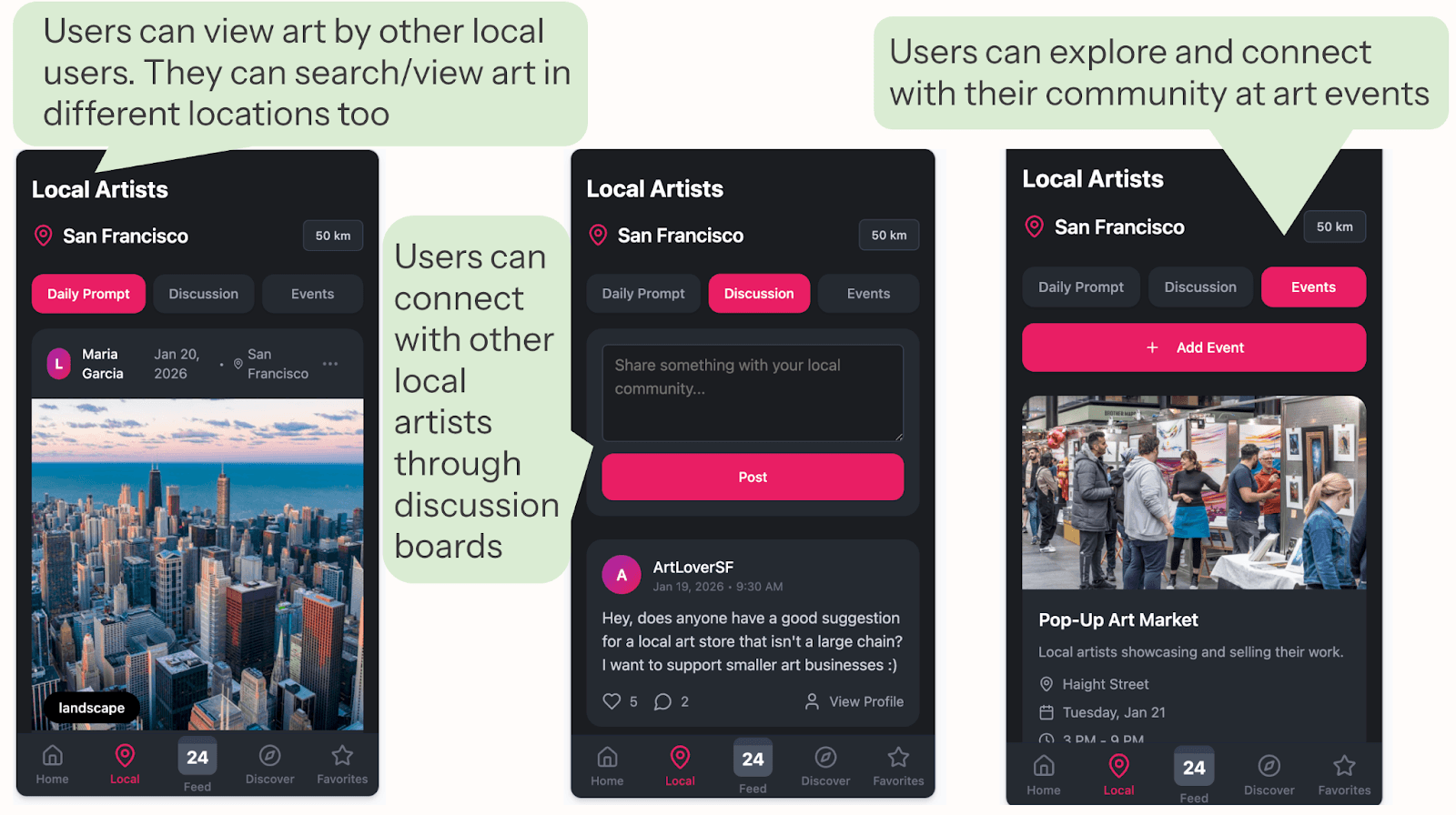
Sketch a Day primarily fosters a virtual community, where users create independently and share their work through a global feed. Interaction is limited, with direct messaging restricted to Gold members, meaning most users engage with others passively rather than collaboratively. As a result, artists are largely practicing alone and only connecting after the fact through shared posts.
The Proposed Solution: Social Preferences
The solution expands beyond a purely virtual community by introducing optional location-based features. In addition to a global feed, users can discover local artists, engage in discussions, and explore nearby events.
This supports more flexible forms of connection, allowing users to engage socially or in-person based on their preferences.
View the Prototype
For the best experience, open the prototype on a mobile device by tapping "See Prototype" below the QR code, or scan the QR code if you’re viewing on desktop.

See Prototype

